Troubleshooting
While PxPlus activation is normally a straightforward process, some issues may arise because of missing files/directories, incorrect licensing, permission difficulties, etc. Be aware that activations are verified during the PxPlus start_up, not by the activation utility itself. The PxPlus version and serial number are displayed when starting a new session.
If you experience an issue, submit a Helpdesk ticket to PVX Plus Support at
https://helpdesk.pvxplus.com. Select the Open a New Ticket button or top menu bar option.
Enter your support request and include the following:
- A valid email address
- Your full name
- System ID
- Machine Class Number
- Product Serial Number (Do not include license Activation Keys)
- Software versions and types of equipment
- Description of the issue and symptoms (only one issue description per ticket)
Important Note:
To help resolve your issue as quickly as possible, all requested information must be provided. Missing details will result in delays.
An administrative fee may apply for licenses not enrolled in the
Continuous Care Program (CCP) and for unsupported versions.
Activation Messages (Windows)
The message below indicates that PxPlus cannot locate or open the ACTIVATE.PVX file.

Possible causes of this issue include:
- Incorrect permissions on the directories leading to the activation file or on the
ACTIVATE.PVX file itself. See
Permission Issues.
- The Library= setting in the INI file points to an invalid directory.
- The
PVXLIB environment variable references an invalid directory.
- The ACTIVATE.PVX file does not exist, which means that the activation program was not run correctly (or at all).
The message below indicates that the activation data does not agree with the current machine configuration:
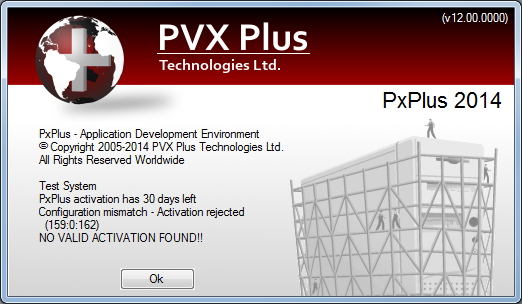
Possible causes of this issue include:
- The path name, Library=, in the INI file points to the wrong directory.
- The activation file was copied from another machine.
- PxPlus was moved from a different location on disk or from another file system.
- The system information has changed since the activation key was generated.
- An attempt was made to upgrade or install a permanent activation over a demo activation. When purchasing a license, the demo activation must be completely removed and replaced by the new temporary or permanent activation values you were issued; i.e. new serial number, user count, expiry date (if any), and activation key.
- The activation file was restored from a backup (i.e. system information has changed). This requires an updated activation key.
Activation Messages (UNIX/Linux)
The message below indicates that PxPlus cannot locate the ACTIVATE.PVX file.
Cannot open ACTIVATION key file
NO VALID ACTIVATION FOUND!!
Possible causes of this issue include:
- Incorrect permissions on the directories leading to the activation file or on the
ACTIVATE.PVX file itself. See
Permission Issues.
- The
PVXLIB environment variable has not been set, or it references an invalid directory.
- The ACTIVATE.PVX file does not exist, which means that the activation program was not run correctly (or at all).
- Use of ./ (dot-slash) instead of the full path name to launch the executable.
The message below indicates that the activation data does not agree with the current machine configuration:
Configuration Mismatch - Activation Rejected
NO VALID ACTIVATION FOUND!!
Possible causes of this issue include:
- The activation was copied from another machine.
- PxPlus was moved from a different location on disk or from another file system.
- The system information has changed since the activation key was generated.
- An attempt was made to upgrade or install a permanent activation over a demo activation. When purchasing a license, the demo activation must be completely removed and replaced by the new temporary or permanent activation values you were issued; i.e. new serial number, user count, expiry date (if any), and activation key.
- The activation file was restored from a backup (i.e. system information has changed).